Key Takeaways
- A pure sine wave UPS produces a power waveform that more closely matches utility power, offering broader compatibility. It is especially well suited for servers, medical equipment, precision instruments, motor-driven devices, and computers with active PFC power supplies.
- A simulated sine wave UPS, also known as a modified sine wave UPS, is generally more affordable and can provide short-term backup power for routers, standard monitors, and some basic office equipment.
- For equipment that is sensitive to power quality, expensive, or difficult to take offline, a pure sine wave UPS is generally the better choice.
- When choosing a UPS, waveform is only one factor. You should also consider rated output power, peak power, transfer time, battery capacity, backup runtime, and long-term maintenance costs.
- Actual UPS runtime depends on load power, battery capacity, inverter efficiency, battery health, and the operating environment. Do not rely on the manufacturer’s advertised runtime alone.
Introduction
When utility power suddenly goes out, or when voltage rises or falls outside the normal range, a UPS (Uninterruptible Power Supply) can keep connected equipment running for a short period. This gives you time to save data, shut systems down properly, or keep critical equipment operating.
However, UPS products on the market generally fall into two waveform categories: pure sine wave UPS systems and simulated sine wave UPS systems. Both can provide backup power, but they differ significantly in output waveform, equipment compatibility, operating noise, and cost. So, what is the difference between pure sine wave and simulated sine wave power? Which type of UPS should you choose for a computer, server, or household appliance? This guide breaks down the differences based on real-world use cases.
What Is a Pure Sine Wave UPS?
A pure sine wave UPS produces smooth, continuous sine wave AC power when operating on battery or in inverter mode. Its output closely resembles the AC waveform supplied by the utility grid, allowing it to provide stable power to most AC-powered equipment.
With a pure sine wave, voltage changes smoothly rather than in noticeable steps. This helps reduce harmonic interference and allows power supplies, motors, transformers, and control circuits inside connected equipment to operate more consistently.
A pure sine wave UPS is typically a good choice for:
- Desktop computers, workstations, and high-performance gaming PCs;
- Computers and servers with active PFC power supplies;
- NAS systems, network servers, and data storage equipment;
- Medical instruments, laboratory equipment, and precision measuring devices;
- Audio systems, recording equipment, and professional A/V equipment;
- Motor- or compressor-driven loads such as refrigerators, water pumps, and fans;
- Telecommunications base stations, industrial controllers, and critical security systems.
If your equipment is expensive, sensitive to power quality, or likely to cause data loss or business disruption if it shuts down unexpectedly, a pure sine wave UPS is usually the safer choice.
What Is a Simulated Sine Wave UPS?
A simulated sine wave UPS is also commonly called a modified sine wave UPS, approximated sine wave UPS, or stepped-wave UPS. Instead of producing a completely smooth AC waveform, it uses a series of voltage steps to approximate a sine wave.
This design uses relatively simple circuitry, so these UPS systems are usually less expensive. For equipment that only needs short-term backup power, has a relatively simple internal power supply, and is not sensitive to waveform quality, a simulated sine wave UPS may be sufficient.
Common applications include:
- Home routers, modems/ONTs, and network switches;
- Some standard office computers;
- Some monitors and basic peripherals;
- Basic surveillance equipment;
- Low-power electronic devices that are not highly sensitive to waveform quality.
Keep in mind that “the device powers on” does not necessarily mean “there will be no long-term impact.” Some equipment connected to a simulated sine wave UPS may produce noticeable buzzing, run hotter, operate less efficiently, restart unexpectedly, or fail to work properly. Before buying, check the equipment manufacturer’s requirements for backup-power waveform.
Key Differences Between Pure Sine Wave and Simulated Sine Wave UPS Systems
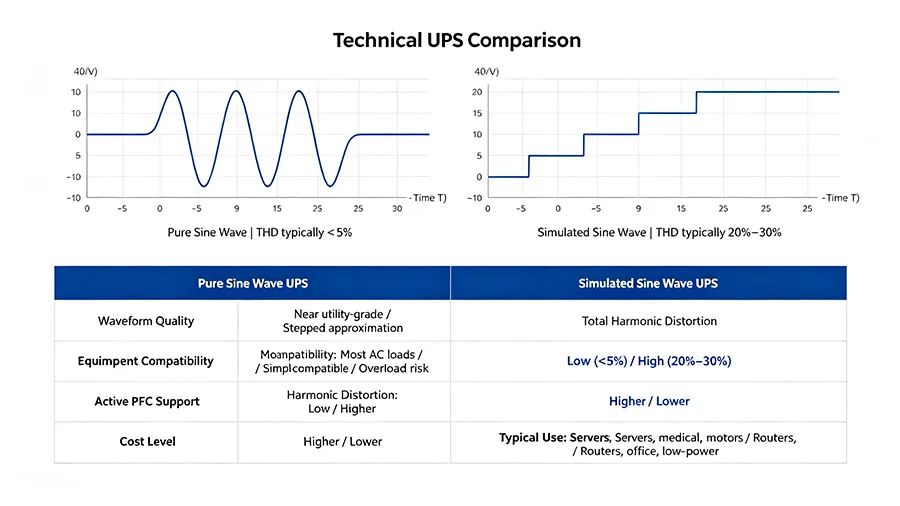
| Comparison | Pure Sine Wave UPS | Simulated Sine Wave UPS |
| Output waveform | Smooth and continuous; close to utility power | Stepped waveform that approximates a sine wave |
| Equipment compatibility | High; suitable for most AC-powered equipment | More limited; some sensitive equipment may not be compatible |
| Operating noise | Usually lower | Some equipment may produce a buzzing sound |
| Performance with motor loads | Generally smoother operation | May run hotter, become noisier, or have difficulty starting |
| Active PFC power supplies | Generally better compatibility | May cause power loss, shutdowns, or protection to trigger |
| Electromagnetic and harmonic interference | Relatively low | Typically more noticeable |
| Equipment heat | Usually lower | Some equipment may generate additional heat |
| Product cost | Usually higher | Usually lower |
| Recommended applications | Servers, workstations, precision equipment, and critical loads | Routers, general office equipment, and basic backup-power applications |
Why Are Active PFC Power Supplies Better Suited to Pure Sine Wave UPS Systems?
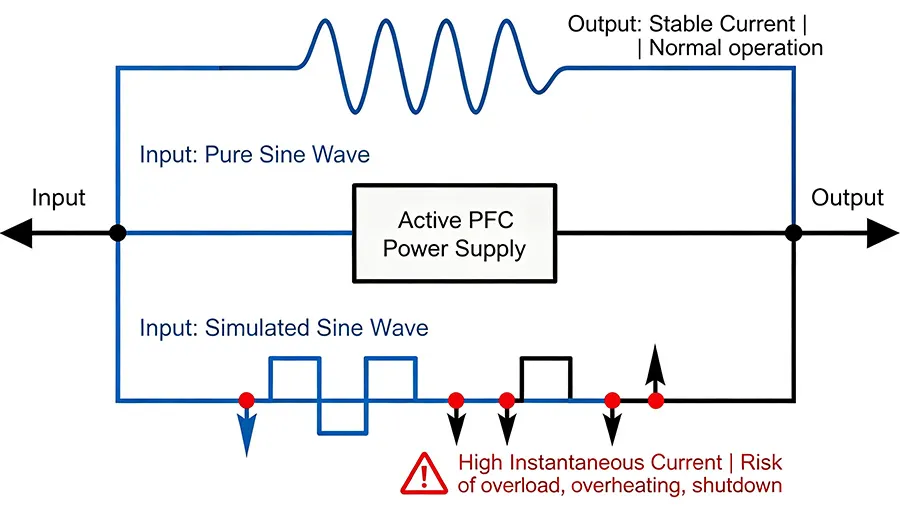
Many modern computers, workstations, and servers use power supplies with active power factor correction, commonly known as active PFC. These power supplies can improve power factor and reduce reactive power, but they are often more sensitive to the waveform of the incoming power.
When an active PFC power supply is connected to a simulated sine wave UPS, the stepped waveform can cause higher instantaneous current at the power supply input. With certain UPS and power supply combinations, you may experience the following:
- The computer shuts down immediately after the UPS switches to battery mode;
- The power supply makes unusual noises;
- The UPS enters overload or protection mode;
- The equipment repeatedly restarts;
- The power supply or UPS becomes noticeably hotter.
If you are choosing a UPS for a gaming PC, graphics workstation, server, or high-power desktop computer, first check whether the power supply uses active PFC. If you cannot confirm, a pure sine wave UPS is generally the safer option.
Which Type of UPS Should You Choose for Different Equipment?
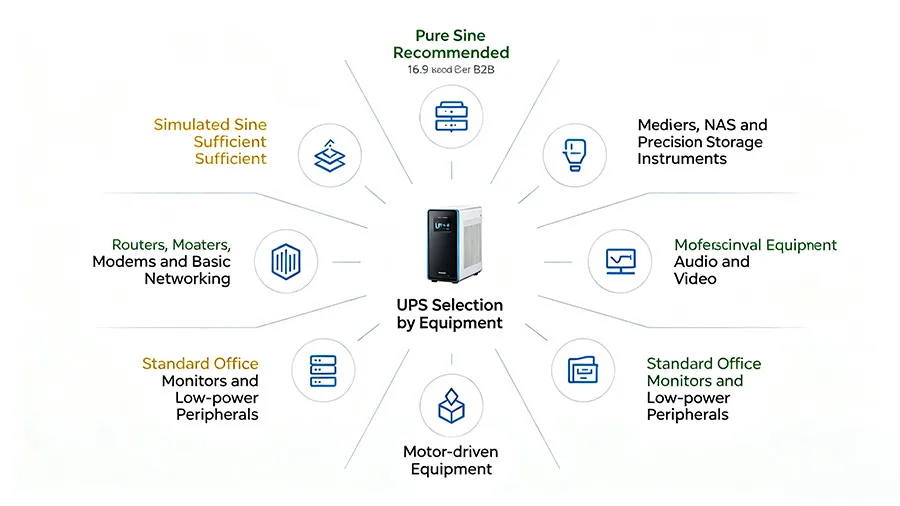
- Desktop Computers and Gaming PCs
A standard low-power computer may work with a well-made simulated sine wave UPS. However, for gaming PCs with a dedicated graphics card, high-wattage power supply, or active PFC power supply, a pure sine wave UPS is recommended.
You should also size the UPS based on the computer’s actual power draw under heavy load rather than relying only on the maximum wattage printed on the power supply label. Leave enough headroom for the computer, monitor, and essential networking equipment so the UPS is not operating near full load for extended periods.
- Servers, NAS Systems, and Network Storage
Servers and NAS systems often store important data, and an unexpected power outage can lead to file corruption, RAID issues, or business interruptions. A pure sine wave UPS is therefore a better fit for these systems. USB, RS-232, or network communication features are also useful because they can trigger an automatic safe shutdown when the battery runs low.
- Routers, Modems/ONTs, and Surveillance Equipment
Routers, modems/ONTs, and small surveillance devices typically use relatively little power. If your main goal is simply to keep your network online for a while during an outage, a simulated sine wave UPS may offer good value.
Still, check the supported input range of each device’s power adapter. For security systems that need to run continuously year-round, a pure sine wave UPS may also be worth considering for more stable backup power.
- Refrigerators, Water Pumps, and Other Motor-Driven Equipment
Refrigerators, air conditioners, water pumps, fans, and similar equipment may draw several times their normal running current at startup. If the UPS cannot provide enough short-term output, it may fail to start the equipment even when its continuous power rating appears sufficient.
These loads are generally better suited to a pure sine wave UPS. Pay close attention to peak output, surge capability, and compatibility with motor loads. Before selecting a system, it is best to consult the equipment manufacturer or UPS manufacturer.
- Audio and Professional A/V Equipment
Harmonics from a simulated sine wave can enter an audio system through the power supply and cause background noise, buzzing, or other interference. For amplifiers, recording equipment, and professional A/V systems where sound quality matters, a pure sine wave UPS is generally recommended.
- Medical Equipment and Precision Instruments
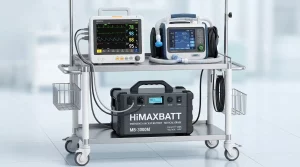
Medical devices, testing instruments, and laboratory equipment often have stricter power-quality requirements. For these applications, follow the equipment manufacturer’s power specifications first and use a professional UPS with the appropriate certifications and safety compliance. Do not choose a UPS based on wattage or price alone.
How Do You Calculate the UPS Power Capacity You Need?
When selecting a UPS, start by calculating the total power draw of all the equipment you plan to connect. For example:
- Desktop computer actual power draw: 350W;
- Monitor: 40W;
- Router and modem/ONT: 20W;
- NAS: 60W.
The total load is approximately 470W. Because loads fluctuate and startup current or future expansion may increase demand, choosing a UPS rated at exactly 470W is not recommended. A common approach is to leave roughly 20% to 30% or more headroom, depending on the type of load and the manufacturer’s recommendations.
UPS products are also commonly rated in both VA (volt-amperes) and W (watts). VA represents apparent power, while W represents real power, so the two values should not be treated as interchangeable. When shopping for a UPS, check both the VA rating and the watt rating and make sure both are sufficient for your load.
What Determines UPS Battery Runtime?
How long a UPS can run is not determined solely by the Ah (amp-hour) rating printed on the battery. Actual backup runtime is typically affected by:
- The total power draw of the connected equipment;
- The capacity and number of batteries inside the UPS;
- Battery voltage;
- Inverter conversion efficiency;
- Battery age and health;
- Ambient temperature;
- Discharge rate;
- The UPS system’s own power consumption;
- Whether an external battery pack is used.
The same UPS may have a dramatically different runtime at a 100W load than at a 500W load. For critical applications, use the manufacturer’s load-versus-runtime curve rather than relying on a simple theoretical formula for your final decision.
What Else Should You Consider When Buying a UPS?
In addition to output waveform, pay close attention to the following specifications when choosing a UPS:
- UPS type: Standby UPS systems are generally more affordable; line-interactive UPS systems can handle a certain amount of voltage fluctuation; online double-conversion UPS systems continuously convert incoming power and are better suited for critical equipment.
- Rated output power: Make sure both the W and VA ratings can support your load, with reasonable headroom.
- Transfer time: Some sensitive equipment may be affected by longer transfer times.
- Battery type: Common options include lead-acid and lithium batteries. They differ in weight, cycle life, maintenance requirements, and cost.
- Replaceable battery: A replaceable battery can help extend the overall service life of the UPS system.
- Communication and management features: Automatic shutdown, real-time monitoring, alert notifications, and remote management are especially valuable for servers and NAS systems.
- Number of outlets and connector standards: Make sure all equipment that needs battery backup can be connected properly, and avoid plugging high-power devices such as printers or space heaters into the UPS without confirming compatibility.
- After-sales support and certifications: Prioritize reputable brands that provide clear product specifications, quality assurance, and reliable customer support.
Frequently Asked Questions (FAQ)
- Is a Pure Sine Wave UPS Always Better Than a Simulated Sine Wave UPS?
In terms of output waveform, equipment compatibility, and power quality, a pure sine wave UPS generally has the advantage. However, it also tends to cost more. For low-power, noncritical devices such as routers, a well-made simulated sine wave UPS may be all you need. The key is to match the UPS to the type of load and how you plan to use it rather than simply choosing the highest-spec option.
- Can a Simulated Sine Wave UPS Damage a Computer?
There is no one-size-fits-all answer. Many standard computers can use a simulated sine wave UPS for short periods, but computers with active PFC power supplies may experience compatibility issues, unusual noise, or shutdowns when the UPS switches to battery. Check the compatibility guidance for both the computer’s power supply and the UPS, and avoid operating equipment for long periods if it is running unusually hot or making abnormal noise.
- Does a Laptop Need a Pure Sine Wave UPS?
Laptops have built-in batteries, and their power adapters typically tolerate a range of input conditions, so a UPS is not always necessary. If you need backup power for a laptop, docking station, monitor, and network equipment at the same time, choose a UPS based on the compatibility requirements of the entire setup. If stable power is especially important, a pure sine wave UPS remains the safer option.
- Can a UPS Power a Refrigerator or Air Conditioner?
Some UPS systems can, but you must confirm that the unit supports motor or compressor loads and provides enough continuous output power and startup surge power. Standard computer UPS systems are often not designed to run refrigerators, air conditioners, or water pumps directly. For these applications, use a properly sized pure sine wave inverter power system or a professional UPS designed for the load.
- How Often Does a UPS Battery Need to Be Replaced?
Replacement intervals depend on battery type, cycle count, ambient temperature, depth of discharge, and charging management. High temperatures, frequent deep discharges, and prolonged overcharging or undercharging can all shorten battery life. If runtime drops significantly, charging becomes abnormal, the battery case deforms, or the system continues to issue alarms, inspect the battery promptly and replace it according to the manufacturer’s instructions.
- Is a Pure Sine Wave UPS More Energy Efficient?
A pure sine wave output can help certain power supplies, motors, and transformer-based loads operate more smoothly, but overall system efficiency also depends on UPS topology, inverter efficiency, standby power consumption, and load percentage. When comparing products, review efficiency data at different load levels.
- What Is the Difference Between a UPS and an Inverter?
The primary purpose of a UPS is to provide uninterrupted or nearly uninterrupted backup power to connected equipment. UPS systems also commonly include charging, voltage regulation, surge protection, and management features. An inverter’s main job is to convert DC power into AC power, and it may not provide fast transfer, automatic shutdown, or comprehensive power protection. Product features can overlap, so always check the specifications of the specific system.
- Can You Plug a Power Strip Into a UPS?
Whether this is allowed depends on the UPS manufacturer’s instructions. Even when it is permitted, adding more outlets does not increase the UPS’s rated capacity. Do not connect high-power devices such as laser printers, electric kettles, space heaters, or microwave ovens to the battery-backup outlets of a standard UPS, as doing so may trigger overload protection or create a safety risk.
About HiMAXBATT Batteries
HiMAXBATT focuses on battery and energy storage products, providing reliable battery solutions for UPS backup power, home energy storage, telecommunications equipment, industrial systems, and other applications. Based on your equipment’s power requirements, desired runtime, installation space, and cycle-life needs, HiMAXBATT can help you identify an appropriate battery solution.
A stable, reliable UPS system depends not only on the inverter and control circuitry, but also on batteries that are safe, durable, and properly matched to the application. With HiMAXBATT, you can identify suitable battery capacity, operating voltage, discharge performance, and configuration options based on your real-world requirements, helping provide longer-lasting, more dependable backup power for critical equipment. If you need batteries for a UPS or energy storage project, contact HiMAXBATT for product information and professional support.